Profiling and Optimization of AI Training Workloads
Find the bottleneck before you buy more nodes.
Sam Foreman, Nathan Nichols · Argonne National Laboratory
2026-10-15 · Genesis Mission Hackathon · Advanced A3
Roadmap
Measure → localize → fix. The order is the content.
| 1 | Baseline | tokens/sec, MFU, and the ceiling — 15 min |
| 2 | Instrument | torch.profiler on a real run — 25 min |
| 3 | Read the trace | compute vs comms vs data — 25 min |
| 4 | Fix | one measurement per fix — 25 min |
Then the self-progress block, where you run it on your own model.
Who this is for
Your run works. It is slower than it should be. You do not know whether that is code, config, or nodes.
- Assumed: a run that launches, an allocation, willingness to read a trace
- Not covered: getting off the ground, failures, checkpointing
If your run does not launch yet
Wrong session. The self-progress block is a better use of the next 90 minutes, and ATPESC 2026 covers getting started and staying alive.
More nodes is not a fix
Scaling an inefficient run scales the inefficiency.
The job we profile later this hour is idle 90.7% of every step. Another 512 nodes buys 90.7% idle on 512 more nodes. Same fraction, bigger bill.
That idle is inside the step — the GPU sitting between kernels while one rank waits. It is not queue time, not a dead node, not walltime you lost to the scheduler. Nodes do not touch it.
First question, before any change
Is the GPU busy?
Pick the number first
| Metric | What it tells you | Use it for |
|---|---|---|
| tokens/sec/GPU | what you are paying | the headline |
| step time | decomposes into phases | debugging |
| MFU | how much machine is left | knowing when to stop |
The trap: 2× on a kernel that is 15% of the step is a 7% win. Speed up the thing that dominates, or do not bother.
🍋 ezpz
Distributed PyTorch setup and launch. The same script runs on a laptop, one GPU, or a thousand-node supercomputer, with no code changes.
import ezpz
rank = ezpz.setup_torch() # CUDA/NCCL, XPU/CCL, MPS, or CPU/Gloo
model = MyModel().to(ezpz.get_torch_device())
model = ezpz.wrap_model(model) # FSDP by defaultezpz launch python3 train.py # PBS or SLURM: hostfile and ranks found for youThe FLOP counter, timers, and profiler context in the rest of this deck all come from it.
- Code: github.com/saforem2/ezpz
- Docs: ezpz.cool
MFU: how much of the machine are you using?
MFU=peak FLOP/s×step timemodel FLOPsBoth per-device, so world_size drops out. Every rank does the same work.
Do not hand-derive the numerator. ezpz counts it with FlopCounterMode
(real ops, not 6ND) and looks up the peak, computing Intel PVC dynamically:
from ezpz.flops import estimate_model_flops, compute_mfu
flops = estimate_model_flops(model, input_shape) # counted, not estimated
mfu = compute_mfu(flops, step_duration) # peak auto-detectedAuroraGPT production chains: 20B at 17-22%, 2B at 9-12%. Bigger model, better utilization, same machine.
The job we profile today runs at 0.33% MFU
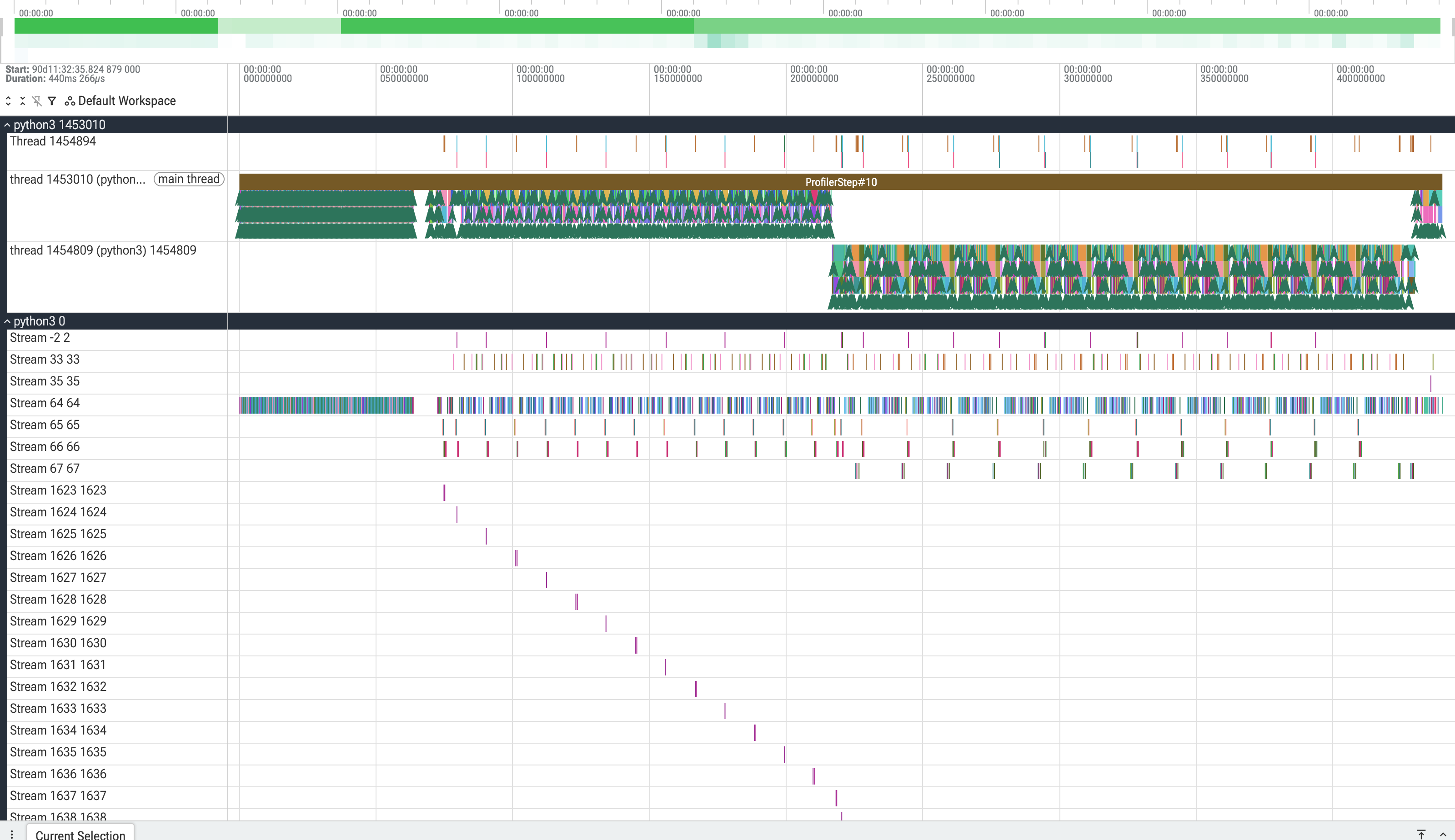
125M params, seq 1024, tp=2 across 24 ranks. Where a 440 ms step goes:
The gaps are bigger than the kernels. Python cannot launch work fast enough to keep the device fed.
The ceiling: roofline
Arithmetic intensity (FLOP per byte) against achievable FLOP/s. Two regimes, two different fixes:
- Memory-bound — left of the ridge. Fusion, precision, layout.
- Compute-bound — right of it. Bigger matmuls, better kernels.
Knowing which side you are on tells you which half of this talk applies.
Both machines ask for roughly the same thing: ~200 FLOP per byte before compute becomes the limit.
Instrument it
Four decisions, four flags:
| Decision | Why | Flag |
|---|---|---|
| skip the warmup | step 1 is allocator + autotune | --pytorch-profiler-warmup |
| capture a few steps | 1 is noise, 100 is gigabytes | --pytorch-profiler-active |
| one rank | 2048 ranks × traces → Lustre | --rank-zero-only |
| pay for what you read | shapes/stack/memory cost | --record-shapes, … |
Defaults: wait=1 warmup=2 active=3 repeat=5.
Profiling the warmup is the classic mistake
Step 1 is allocator churn and autotuning. It is not your training step.
Profiling is not free: step time +57%, and writing a 101 MiB trace stalls the step ~65×.
Before you reach for the profiler
A profiler perturbs what it measures and hands you gigabytes to interpret. A timer around each phase answers which quarter of the step in five minutes.
Often that is the whole answer.
import ezpz
from ezpz.history import StopWatch
with StopWatch("fwd", iter=step):
loss = model(batch)
ezpz.synchronize() # GPU work is async: wait for itezpz also has timeitlogit (decorator, logs per-rank) and History.update(),
which is where the dt= dtf= dtb= sps= tps= mfu= log lines come from.
Vendor tools
torch.profiler says which op. The vendor tool says why that op is
slow — occupancy, bandwidth, which collective algorithm got picked.
Most people never need this. Go here when the trace blames a kernel and you cannot see why.
Aurora · Intel Max 1550
module load frameworks/2026.1.0
unitrace -d -h \
--chrome-itt-logging \
--chrome-kernel-logging \
-o utrace python step.py
Polaris · Perlmutter · NVIDIA
module load pytorch/2.13.0
nsys profile -t cuda,nvtx,osrt \
-o step_trace \
--force-overwrite true \
python step.py
Do not module load pti-gpu
frameworks/2026.1.0 already loads pti-gpu/0.17.0 and puts unitrace
2.3.0 on PATH. Loading pti-gpu/1.0.1-rc1 on top breaks torch outright:
ImportError: libpti_view.so.0: cannot open shared object file.
Name your own phases
A vendor timeline shows kernels. Annotation makes it show your phases.
| NVIDIA | Intel | |
|---|---|---|
| API | torch.cuda.nvtx | torch.profiler.itt |
range_push / pop | yes | yes |
range_start / end | yes | no |
| on the other vendor | raises | no-ops |
nvtx = torch.cuda.is_available()
push = torch.cuda.nvtx.range_push if nvtx else torch.profiler.itt.range_push
pop = torch.cuda.nvtx.range_pop if nvtx else torch.profiler.itt.range_popOnly one direction needs guarding: NVTX raises on XPU, ITT no-ops on
CUDA. ezpz has the wrapper but no annotation yet (#270).
One setup function, three schedulers
| Machine | Device | Activity | Sorts by |
|---|---|---|---|
| Aurora | Max 1550 | XPU | self_xpu_time_total |
| Polaris | A100 | CUDA | self_cuda_time_total |
| Perlmutter | A100 | CUDA | self_cuda_time_total |
ezpz fills in that right-hand column for you. You write one script and
it runs on all three — no if xpu: anywhere in your code.
Profiling is the part that travels badly
Aurora needs --no-with-stack for FSDP+TP.1
Perlmutter hangs outright. Demo from Polaris or Aurora.
In your own training loop
from ezpz.profile import get_profiling_context
with get_profiling_context(
profiler_type="torch",
wait=1, warmup=2, active=3, repeat=1,
rank_zero_only=True,
with_stack=False, # True hits the RecursionError on Aurora
outdir="./traces",
) as prof:
for step, batch in enumerate(dataloader):
train_step(batch)
if prof is not None:
prof.step()Three lines around a loop you already have. It picks the activity set, the sort column, and the rank gating.
The launch is not identical
export HTTPS_PROXY=http://proxy.alcf.anl.gov:3128 # ALCF compute: no internet
source <(curl -fsSL https://ezpz.cool/utils.sh)
ezpz_setup_env && ezpz_install # install is a SECOND step
ezpz launch python3 -m ezpz.examples.profiler --profile --rank-zero-onlyVerified on Polaris. Note examples.profiler — the small one. Swap in
fsdp_tp --tp 2 and you need --no-with-stack on Aurora, and it hangs
outright on Perlmutter.
Four things that bite
- ALCF compute has no route out.
Set
HTTPS_PROXY=http://proxy.alcf.anl.gov:3128 - The venv is named after
cwd. Don’tcdbetween setup and launch. - It tokenizes 5.9 GB before step 0.
Pass
--hf-limit 512. - PBS jobs need a login shell.
#!/bin/bash -l, not#!/bin/bash.
None of these fail where the mistake is. That is what costs the afternoon.
Reading a trace
--profile drops torch-profiler-rank0-step{N}-{timestamp}.json. Open it in
Perfetto or chrome://tracing.
CPU rows on top (what Python asked for), device rows below (what ran). A gap in the device row is the GPU waiting.
From the job behind this talk. The GPU is idle 90.6% of every step.
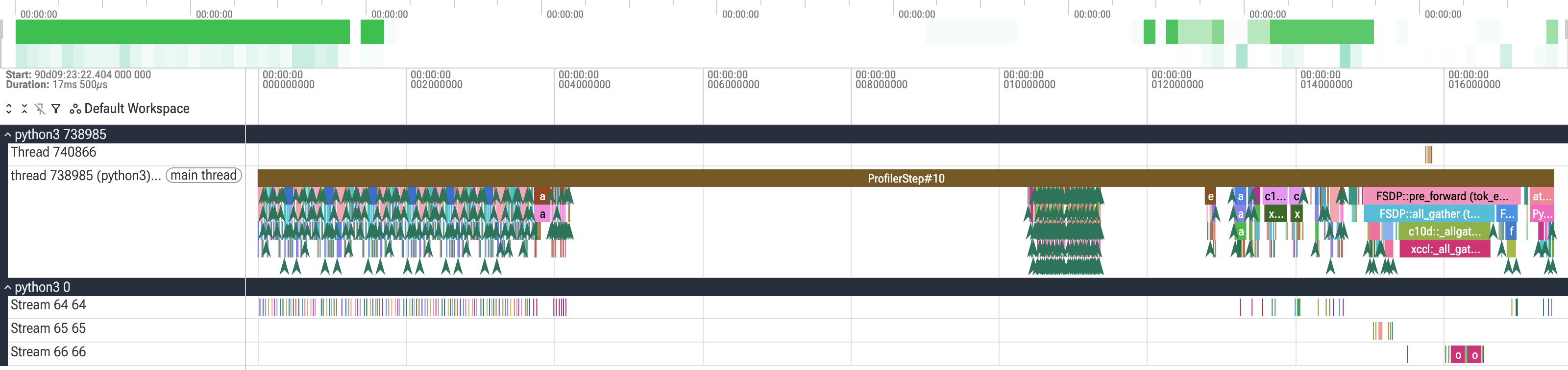
Stream 64/65/66 blank. That whitespace is the GPU waiting on all_gather.Three shapes, three fixes
| Trace shows | Diagnosis | Fix section |
|---|---|---|
| idle at the start of every step | data stall | dataloader, FS |
| idle mid-step, regular | communication | collective, overlap |
| busy but throughput low | kernel efficiency | precision, fusion, shapes |
Everything after this slide is one of three branches.
Take a photo of this one
It is the table you will want in front of you at 2am.
Fix: data stalls
Usually the cheapest big win, and the one teams skip because it is not the interesting part.
- Workers, prefetch, pinned memory — the boring three, in that order
- Many small files is a metadata problem, not a bandwidth problem
- Lustre does not like you — one
stat()storm × 50k ranks
Same failure as import torch at scale
The fix is not a faster filesystem. It is not hitting the filesystem from
every rank. See ezpz yeet.
Measured on Aurora, 8 → 4096 nodes: per-node env cost 8.7 s → 0.18 s (48×). Full-scale pre-launch 12.5 min, first step at 16 min.
Fix: communication
- Overlap — the framework probably already does it; confirm in the trace before tuning anything
- TP across nodes is usually the bug, not a tuning problem
Keep TP on-node. DP is nearly free; TP is chatty.
Turn the logs on before you tune anything:
| Aurora | Polaris · Perlmutter | |
|---|---|---|
| verbosity | CCL_LOG_LEVEL=info | NCCL_DEBUG=INFO |
| narrow it | — | NCCL_DEBUG_SUBSYS=INIT,COLL,NET |
| one file per rank | — | NCCL_DEBUG_FILE=nccl.%h.%p.log |
| who hung | TORCH_NCCL_DESYNC_DEBUG=1 | same |
Aurora ships quieter than the library default
oneCCL defaults to warn; the setup lowers it to ERROR. You are getting
less diagnostic output than the library would give you.
Fix: kernel efficiency
- Mixed precision — verify you got it;
bf16in the config is not proof torch.compile— helps often; on AuroraGPT MoE it cost 26% of throughput- Fused attention / optimizer — usually free, check availability per device
- Shapes — pad to the tensor-core multiple
torch.compile is not free
Compile time is real, and it does not always pay back. Measure it like anything else.
Measured: moe_500m, Aurora, 2 nodes / 24 tiles, 2026-04-13. TPS 11,200 →
8,316; TFLOPS 25.22 → 18.70; MFU 8.46% → 6.27%. All three agree on -26%,
which is the same thing as +35% step time — quote one, not both.
Compile also used 2.2× less memory (8.44 → 3.78 GiB). A real trade.
As of April 2026, torch 2.10 — not re-measured since.
When the constraint is memory
Activation checkpointing, ZeRO stages, offload. Each buys memory with compute.
Adam, per parameter: 2 (bf16 param) + 2 (grad) + 12 (fp32 master
- two moments) = 16 bytes. Sharding takes that toward 16/N.
These are slowdowns you accept to fit
Not speedups. Teams reach for them expecting speedups.
Hands-on
No new code. The flags already exist.
# 0 · setup, then install -- setup_env does NOT install ezpz
export HTTPS_PROXY=http://proxy.alcf.anl.gov:3128 # ALCF compute only
source <(curl -fsSL https://ezpz.cool/utils.sh) && ezpz_setup_env
uv pip install --no-cache --link-mode=copy "git+https://github.com/saforem2/ezpz"
# 1 · baseline: how fast is it now?
ezpz launch python3 -m ezpz.examples.fsdp_tp \
--model small --dataset random --train-iters 12
# 2 · same run, instrumented
ezpz launch python3 -m ezpz.examples.fsdp_tp \
--model small --dataset random --train-iters 12 \
--profile --rank-zero-only --no-with-stack144 s, two traces, full table. Open the JSON in Perfetto and you are looking at your own run.
--no-with-stack is not optional for FSDP+TP
Without it the callback dies in key_averages() — which runs before
export_chrome_trace, so you lose the table and the trace.
The other way you lose GPU-hours
Everything so far assumed the run finishes. At scale it does not.
A crash at step 1,900 of 2,000 with a 100-step save interval costs you the recompute, the restart, and the queue wait. None of it shows up in a profile.
Throughput you never used is the same as throughput you never had
An 18% MFU run that dies at 90% is a 0% MFU run.
ezpz launch --auto-retry
On a non-zero exit, scrape the log for known bad-node signatures, retire the named host, rotate in a spare, relaunch. No babysitting.
ezpz launch --auto-retry --nhosts 8 --spare-nodes 2 -- \
python3 -m ezpz.examples.fsdp_tp --model debug \
--ckpt-dir ./ckpts --save-interval 100 --train-iters 3000Catches: watchdog kill (124), walltime-racing crashes (143), Aurora PALS shepherd-9, gloo peer-closed, and zero-progress hangs.
No spare, no retry
Every retryable verdict is gated on has_spares. If --np eats the whole
allocation there is nothing to rotate in and the run ends EXHAUSTED.
Size with --nhosts and leave --spare-nodes.
--auto-retry also flips the idle timeout on: it defaults to 30 min,
so a silent xccl hang gets killed and retried instead of burning the
whole walltime.
Checkpointing without paying for it
Sync save blocks training. Async stages to CPU, fans out in a background
thread, stamps .complete last.
| Model | Ckpt | Sync stall | Async stall | |
|---|---|---|---|---|
agpt-2b | 23 GB | 3.75 s | 1.05 s | 3.6× |
agpt-20b | 232 GB | 23.57 s | 5.4 s | 4.4× |
python3 -m ezpz.examples.fsdp_tp \
--ckpt-dir /shared/ckpts --async-ckpt \
--ckpt-stage-dir /tmp/ezpz-ckpt --save-interval 100Two dead ends got there
A 5.18 s blocking drain that no metric recorded, then a marker stamped a full interval late — async was durable but not resumable. The fix probes on MPI’s own communicator, not the training group, so it cannot deadlock against the gradient all-reduce.
Now do it: one lever at a time
Same job, same 2 nodes, same profiling recipe. Each row is a run.
| change | idle | MFU | tok/s/GPU | |
|---|---|---|---|---|
| A | baseline, bs=1 sl=1024 | 90.7% | 0.33% | 1,392 |
| B | --batch-size 8 | 76.4% | 2.51% | 10,484 |
| C | --batch-size 16 | 63.8% | 4.54% | 18,947 |
| D | + --seq-len 4096 | 19.1% | 9.77% | 27,648 |
| E | + --tp 1 | 10.1% | 12.9% | 36,461 |
One mechanism explains all of it: give each kernel launch more work. Comm share falls 25% → 2.7% as a consequence, not a separate fix.
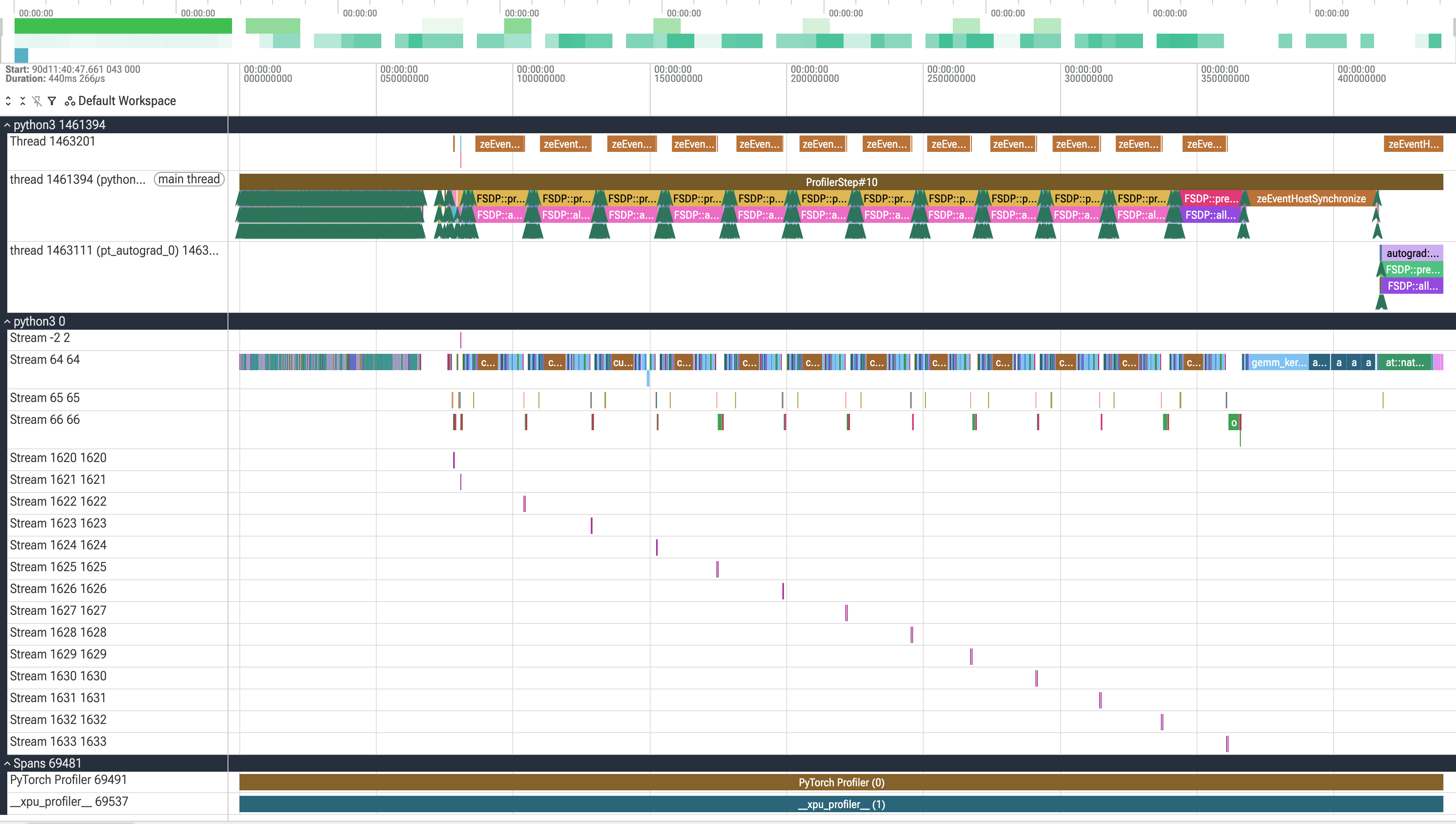
The same 440 ms


Same trace viewer, same zoom, same 440 ms. The whitespace is the win.
Where it stops, and why
90.7% → 10.1% idle. MFU 0.33% → 12.9%, a 39× gain.
Also still bad — and the trace says why. The residual 188 ms of idle is 3,735 gaps at a 23 µs median. Launch overhead never disappears; it only gets amortized.
The honest ceiling is memory, not cleverness
E peaks at 55.7 of 64 GiB. Both bigger-model configs OOMed
outright. To go further you need a model big enough to justify 24 tiles,
which is a different talk.
Takeaways
- Baseline and ceiling before any change.
- The trace names the problem. Ours said launch overhead, not comms — and the first guess was wrong.
- One lever per measurement. 90.7% → 10.1% idle, five runs.
- Stop when the measurement says stop. Ours stopped at memory.
Slides: samf.sh/talks/2026/10/15
export HTTPS_PROXY=http://proxy.alcf.anl.gov:3128 # ALCF compute only
source <(curl -fsSL https://ezpz.cool/utils.sh) && ezpz_setup_env
uv pip install --no-cache --link-mode=copy "git+https://github.com/saforem2/ezpz"
ezpz launch python3 -m ezpz.examples.fsdp_tp \
--profile --rank-zero-only --no-with-stackFind me in the self-progress block.
Acknowledgements
This research used resources of the Argonne Leadership Computing Facility at Argonne National Laboratory, which is supported by the Office of Science of the U.S. Department of Energy, Office of Science, under contract number DE-AC02-06CH11357.
Footnotes
-
torch.profilerrecords a Python stack per op whenwith_stack=True(the default), andp.key_averages()then walks those stacks recursively intorch/autograd/profiler_util.pyto build the event tree — FSDP2 + TP call stacks are deep enough to exceed Python’s default 1000-frame limit, and the run exits 143 having written zero traces. Aurora job8881403is a one-variable pair (same allocation, samefsdp_tp --model small --tp 2): the default writes 0 traces atrc=143,--no-with-stackwrites 5 atrc=0. Nothing inezpzis implicated; its frames in the traceback are just the outer call path. This is a depth threshold, not an Aurora property — Polaris (job7670657) profiled the same example with stacks and wrote 5 traces. Aurora crosses the limit first. ↩